


Magic Tiles 3™ - Piano Game
4.6111.40K Reviews
App Specs
- Version
- 13.084.006
- Updated On
- License
- Free
- Downloads
- 500,000,000+
- Developer
- AMANOTES PTE. LTD.
- Categories
- Music
- Platform
- Android, iOS
Screenshots




 Analysis by AppCompare
I often see Magic Tiles 3™ - Piano Game work best as a shared-device pick-up game: one person can play a song, pass the phone or tablet to someone else, and compare how each handles the same kind of fast rhythm. That makes it easy to bring into a quiet moment at home without needing a long setup or a whole group to join in. I would still treat it as a game for turns rather than assume everyone will enjoy playing side by side; the focus is on following the tiles on one screen, so a little space and a clear handoff keep the experience relaxed.
Making one device work for different players
On a household device, I’d agree on a simple boundary before starting: who is playing, how long the turn lasts, and whether anyone is trying a song that might be difficult for the next person. Those are ordinary coordination choices, not special controls inside the game. Because the action depends on quick, accurate tapping, handing over a phone while a song is underway is likely to interrupt the attempt. I find it smoother to wait until a round ends, then let the next person choose whether to take a turn or watch.
This kind of turn-taking also makes the game easier to enjoy across different skill levels. A confident player may want to chase a cleaner run, while a newcomer may be happier learning the rhythm without an audience. I’d avoid turning a score comparison into a test of who is “best,” especially with younger players or anyone who finds rapid tapping frustrating. Treating each attempt as a short personal challenge keeps the competition friendly and lets people stop when they have had enough.
Guides and Analysis on Magic Tiles 3™ - Piano Game
What to expect before a first session
The basic idea is simple, but the pace can make the first few attempts feel less simple than the controls suggest. The tiles ask for attention to both timing and position, and long notes add a small coordination demand: it is not enough to notice the tile; you have to keep your finger down as required. I would start with a song that feels manageable rather than choosing a track only because it is familiar. Knowing a melody can help with the beat, but it does not guarantee that your fingers will keep up.
For a quick break, the format is appealing because you can focus on one attempt instead of learning a large set of rules first. The trade-off is that a missed tile can end a run, which may make a short session feel abrupt. If that happens, I suggest taking a breath and restarting only if the challenge still feels fun. Rapid retries are satisfying for some players, but they can also turn a casual break into a frustrating loop.
Choosing the right setting for play
I would not treat the music-game label as a promise that this will teach piano. The central task is to react to on-screen tiles in time; that can sharpen attention and finger coordination, but it is different from learning notes, reading sheet music, or practicing an instrument. If the goal is music education, a structured lesson or piano-learning app is a better fit. If the goal is a quick rhythm challenge built around songs, this game is closer to what you want.
It also suits people who enjoy short, score-focused attempts more than players who want to freely explore a song or make their own music. A rhythm game with a more forgiving practice format may be a better choice for someone who dislikes losing a run after a mistake. On the other hand, players who like immediate feedback and a clear reason to repeat a track may find that exact pressure motivating. My advice is to judge it by how the tapping feels after a few tries, not just by whether you recognize the tune.
Worth Reading Before You Choose

Baby Panda World Brings Quick Play to Modern Phones, but Its Game Library Feels Busy

ESPN’s Live Game View Makes Following Close Games Easier

QuizzLand Review: A Good Fit for Short Trivia Breaks, Not Every Player

Basketball Stars: Multiplayer Is Fast, but Can It Recover When Matches Go Wrong?

WEBTOON Turns Phone Updates Into a Better Reading Routine

Link to Windows Runs on Shared Habits, Not Social Feeds
Have you ever found yourself tapping your fingers on the table, lost in the rhythm of a catchy tune? Well, Magic Tiles 3™ - Piano Game might just be the perfect app for you. As a self-proclaimed music game enthusiast, I decided to give this app a try, and let me tell you, it’s like having a tiny concert right in your pocket.
Getting in Tune with the Game
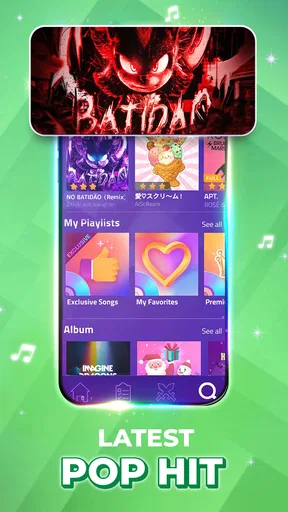
So, what’s the deal with Magic Tiles 3™? At its core, it’s a game that combines catchy music tracks with fast-paced finger-tapping action. When you first open the app, you’re greeted with a sleek, user-friendly interface that practically invites you to start playing. The game offers a variety of musical genres, from classic piano melodies to today’s hits, making it impossible not to find something you’ll love.
How It Works
The gameplay is straightforward yet addictively challenging. As the song plays, tiles start descending from the top of the screen. Your mission, should you choose to accept it, is to tap on these tiles in time with the music. Miss a tile, and it’s game over. But hit them all, and you’re on your way to high scores and bragging rights among friends.
The app also mixes things up by introducing different tile types, like long notes that require you to hold your tap, and double tiles for added complexity. It’s this mix of simplicity and challenge that keeps you coming back for more. Seriously, just one more song is never just one more song.
Understanding the rhythm-game trade-offs
Compared with casual music games that mainly ask you to press to a steady beat, the descending tiles here make timing feel tied to both rhythm and screen reading. I like that combination because it gives my eyes and hands a specific job, rather than asking me to tap without much visual guidance. The flip side is that the screen can feel busy when notes arrive quickly, and someone who prefers a relaxed, listen-first music experience may find the action more demanding than soothing.
That distinction also helps answer a practical question: is it good for a commute or a waiting room? It can be a handy way to fill a short gap, but I would choose a stable place to play and keep the sound at a considerate level. The game needs visual attention, so it is not something I’d use while walking through a crowded area, crossing a street, or doing anything that also needs my eyes. For a bus ride, I’d play only when seated and able to focus rather than treating it like background audio.
Song choice, repetition, and staying comfortable
A useful way to approach the library is to separate “songs I like” from “songs I can comfortably play right now.” A familiar tune may make a session more enjoyable, while a simpler-feeling selection can be a better warm-up for fingers that are not ready for a demanding run. I also find it sensible to stop after a few tense attempts instead of chasing a perfect result indefinitely. The game is built around repeated tapping, so short pauses can make a casual session more comfortable, especially on a small phone screen.
People often wonder whether they need an internet connection for every session. The game’s store summary mentions offline music-game play, which is useful when a connection is inconvenient, but I would not assume that every feature or song behaves the same way offline. If you plan to rely on it during travel, it is sensible to check what is available before leaving a reliable connection. That small bit of preparation avoids finding out at the wrong moment that the particular content you wanted is not ready to play.
What the numbers and purchases mean in practice
The game is free to install, and optional in-app purchases are listed from $0.99 to $49.99 per item. I’d treat that range as a reason to keep purchase expectations clear on a shared device, not as a reason to assume spending is required to try the core rhythm idea. If children use the same phone or tablet, agree on a household rule for purchases and use the device’s existing purchase safeguards where appropriate. That is a practical boundary for any shared game, rather than a claim about a particular family mode in this one.
Its broad reach is notable: it has over 500 million installs, with an average rating of 4.6 from around 3.4 million ratings. Those figures tell me many people have tried it, but they cannot predict whether its pace or song selection will suit one particular player. The game comes from AMANOTES PTE. LTD.; it was released on February 24, 2017, and version 12.122.201 lists Android 7.0 as the minimum operating system. On a device that meets that requirement, I’d still leave room for the usual differences in screen size and responsiveness, since precise tapping feels more comfortable when the display is easy to follow.
Age, expectations, and trust
With an Everyone 10+ content rating, I would still make the decision based on the child and the household, not the label alone. A younger player may enjoy matching tiles to music, while another may find the speed or the end-of-run pressure discouraging. I’d try a session together first and see whether the child is having fun or simply getting upset by missed notes. That gives a more useful answer than assuming every game in the music category is automatically suitable for every age.
For adults sharing a device with children, the practical questions are straightforward: are turns clear, are purchases handled with permission, and is the play happening at a sensible time and place? The game’s quick attempts can make it tempting to keep going, so a natural stopping point—after a song or a short turn—helps keep play from taking over a shared moment. I also would not count on a child’s musical familiarity to make the tapping easy; rhythm recognition and accurate finger timing are separate skills here.
Where it fits among music games
In the wider music-game category, this is a better match for someone who wants a visual, reflex-led challenge than for someone looking for a virtual instrument, music theory practice, or an open-ended rhythm sandbox. That is the key comparison I’d make before installing it. It turns songs into a sequence of timed actions, so the reward is a more controlled run, not learning how to perform the melody on a keyboard. Players who already enjoy chasing accuracy in rhythm games may appreciate that direct loop; people who want to create or arrange music should look elsewhere.
There is also a difference between playing alone and making it a group activity. The multiplayer mode described for the game lets players compete in real time, which can add a social edge when everyone wants a challenge. For a relaxed household evening, though, taking turns on one device may be easier than coordinating a live match. I’d use competition when the group enjoys score comparisons, and keep solo attempts or passing the phone around for mixed ages and experience levels. That way the social part supports the game instead of making every mistake feel public.
Who I would recommend it to
I’d recommend giving it a try if you like familiar songs, quick hand-eye challenges, and the satisfaction of improving through repetition. It is especially convenient for someone who wants a game that can fill a short break without requiring a story or a long session of setup. The simple central action also makes it easy to explain to a friend: watch the tiles, tap in time, and adjust your hands as the patterns change.
I’d skip it if you mainly want to listen to music, learn piano technique, or play at a calm pace with little penalty for mistakes. It may also be a poor fit for anyone who dislikes repeated tapping or feels pressured by score-based competition. Those are not flaws that can be solved by finding the “right” song; they are part of the kind of experience this game offers. Choosing a different music app or a gentler rhythm game would make more sense if those needs matter most.
Why It’s a Game Changer
One of the standout features of Magic Tiles 3™ is its impressive music library. Whether you’re into pop, classical, or something in between, there’s a track for every mood. Plus, the app frequently updates its selection, so you’re never stuck playing the same tunes.
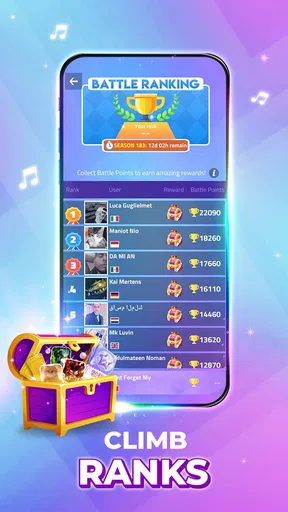
Another highlight is the multiplayer mode, where you can compete against other players in real-time. It’s a great way to test your skills and see how you stack up against the rest of the world. Plus, who doesn’t love a little friendly competition?
Final Thoughts
All in all, Magic Tiles 3™ hits all the right notes for a mobile game. It’s fun, engaging, and the perfect way to pass the time whether you’re waiting for a bus or just chilling at home. The combination of diverse music tracks and challenging gameplay makes it a must-try for anyone with a love for music and rhythm games. So, why not give it a download and let your fingers do the dancing?
A household verdict
For a shared phone or tablet, my verdict is that it can work well when everyone understands the turn-taking and the difference between a music game and a music lesson. I’d keep purchase decisions with the device owner, choose a calm place to play, and let each person decide how competitive they want the session to be. Its free entry point makes trying the basic experience easy, while the listed optional purchases are worth discussing before children play on a shared account or device.
The game is most convincing as a lively, repeatable tapping challenge, not as a universal choice for every music fan. If your household enjoys quick rounds, comparing attempts, or a real-time match now and then, it has a clear place in the mix. If someone wants to relax with songs, build piano skills, or avoid pressure from missed notes, I’d choose a different kind of app for them. That distinction is what makes it easier to recommend honestly: try it for the rhythm and reflexes, and keep expectations—and turns—simple.
Pros
- Engaging gameplay with varied music genres.
- Simple controls make it accessible to all ages.
- Regular updates with new songs and challenges.
- Offline mode available for on-the-go play.
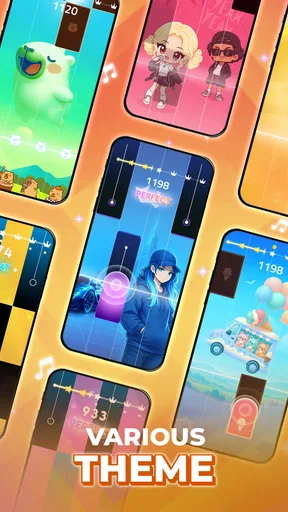
- Visually appealing with smooth animations.
Cons
- Frequent ads can interrupt gameplay.
- In-app purchases can be costly.
- Limited free song options initially.
- Some songs require internet to unlock.
- Can be repetitive after extended play.
FAQs for Magic Tiles 3™ - Piano Game
What is Magic Tiles 3™ and how does it work?
Magic Tiles 3™ is a popular rhythm-based mobile game where players tap on black tiles as they appear on the screen, synchronized to music. The game features a wide variety of songs from different genres, allowing users to enjoy piano music, pop, and more. The objective is to tap accurately to the rhythm to score points and advance through levels.
Is Magic Tiles 3™ free to play, or are there in-app purchases?
Magic Tiles 3™ is free to download and play, but it includes in-app purchases. These purchases can enhance the gaming experience by unlocking additional songs, removing ads, or providing other premium features. While players can enjoy the game without spending money, opting for in-app purchases can offer a more enriched experience.
What are the system requirements for Magic Tiles 3™?
To run Magic Tiles 3™ smoothly, your device should have a recent version of Android or iOS. It generally requires minimal storage space, but ensuring you have enough free space can prevent performance issues. A stable internet connection is also recommended for downloading new songs and updates.
Can I play Magic Tiles 3™ offline?
Yes, Magic Tiles 3™ can be played offline. However, some features, such as downloading new songs or accessing certain premium content, require an internet connection. Playing offline is convenient for continuous gameplay without interruptions, but online access offers more variety and updates.
How does Magic Tiles 3™ compare to similar rhythm games?
Magic Tiles 3™ stands out due to its diverse music library and engaging gameplay. Compared to similar rhythm games, it offers a unique blend of classical and contemporary music, appealing to a wide audience. The game’s user-friendly interface and regular updates keep it fresh and competitive in the rhythm game genre.


